On-Device Fitness Coach #5: Your AI Model Is Not Always Ready
The user opens Fitness Coach, taps Generate insight, and...
nothing happens.
Not because the prompt is bad.
Not because the model returned nonsense.
The model simply isn't ready yet.
Maybe Gemini Nano is supported on the device but still needs to be downloaded. Maybe that download is already happening. Maybe AICore is still getting itself set up. Maybe the feature isn't available on this device at all.
This is one of those parts of on-device AI that disappears beautifully in demos.
We spend a lot of time talking about inference.
But inference has a lifecycle before it ever has an answer.
In Part 4 of this series, we created a boundary around our AI runtime:
Compose UI
      ↓
ViewModel
      ↓
GenerateFitnessInsightUseCase
      ↓
FitnessInsightEngine
      ↓
GeminiNanoInsightEngine
Nothing above FitnessInsightEngine needs to know that Gemini Nano exists.
Great.
Now we need to deal with everything that happens before GeminiNanoInsightEngine can actually do its job.
And there is more there than I originally expected.
“Available on this device” is not the same as “ready right now”
With ML Kit's GenAI Prompt API, we are not packaging Gemini Nano inside the Fitness Coach APK ourselves.
Gemini Nano runs through Android's AICore system service. AICore manages the distribution of Gemini Nano and handles future updates, and lets applications access it for on-device inference.
That is lovely because I really do not want Fitness Coach becoming a model-distribution company on the side.
But it does not mean the app gets to assume this:
User taps button
      ↓
Model exists
      ↓
Inference
The Prompt API exposes four availability states:
- • UNAVAILABLE
- • DOWNLOADABLE
- • DOWNLOADING
- • AVAILABLE
AVAILABLE means the required model assets are downloaded and ready to use. DOWNLOADABLE means the feature can run on the device, but the assets are not downloaded yet. DOWNLOADING means exactly what it sounds like.
UNAVAILABLE needs a little more care. It can mean the device does not support the feature. But according to Google's setup guidance, it can also mean AICore hasn't yet fetched the latest configuration after the device was set up or reset. (Devices with an unlocked bootloader are not supported either.)
That last nuance matters.
I originally had an Unsupported state in my architecture.
Looking at the actual API more closely made me change my mind.
UNAVAILABLE does not always mean “this phone will never support this.”
Sometimes it means “not right now.”
So instead of translating Google's states too aggressively, Fitness Coach gets its own product-level lifecycle.
sealed interface AiReadinessState {
    data object Checking : AiReadinessState
    data object DownloadRequired : AiReadinessState
    data class Downloading(
        val bytesDownloaded: Long,
        val bytesToDownload: Long? = null
    ) : AiReadinessState
    data object WarmingUp : AiReadinessState
    data object Ready : AiReadinessState
    data object Unavailable : AiReadinessState
    data class Failed(
        val reason: ReadinessFailure
    ) : AiReadinessState
}
Google's API tells us what is happening in the runtime.
Our state tells Fitness Coach what that means for the product.
I think that distinction is important.
I started with a ModelManager. Then I renamed it.
The roadmap for this series originally called for a ModelManager.
That name made sense when I wrote it.
But once I started looking at what Fitness Coach actually owns, it felt slightly dishonest.
We are not really managing Gemini Nano.
AICore is.
Our application needs to manage readiness.
So I would rather call this:
interface FitnessAiReadinessManager {
    suspend fun checkReadiness(): AiReadinessState
    fun prepare(): Flow<AiReadinessState>
    fun download(): Flow<AiReadinessState>
    fun close()
}
Just like FitnessInsightEngine, it is an interface with no SDK names in it. Fitness Coach has a Gemini Nano implementation, plus fake and unavailable versions so the whole lifecycle can be seen on an emulator and tested on the JVM.
Its job is narrow:
Ask whether the capability is available
            ↓
Trigger download when needed
            ↓
Observe download progress
            ↓
Warm up the inference engine
            ↓
Expose readiness to the app
            ↓
Release resources when finished
And importantly, it does not generate fitness insights.
That remains the responsibility of FitnessInsightEngine.
So our architecture has now gained another small boundary:
                       FitnessAiReadinessManager
                         │
                         │ availability
                         │ download
                         │ warm-up
                         ▼
Compose UI ← ViewModel ← AiReadinessState
Compose UI
↓
ViewModel
↓
GenerateFitnessInsightUseCase
↓
FitnessInsightEngine
↓
GeminiNanoInsightEngineFitnessInsightEngine owns inference.
FitnessAiReadinessManager owns readiness.
Two different problems. Two different responsibilities.
One detail matters here: in Gemini mode, both implementations share a single GenerativeModel. The client we check and warm up is the same client that runs inference.
Checking availability before showing the feature
Google's current guidance is to call checkStatus() before showing any related UI. That avoids dropping someone into a feature that cannot actually run yet.
At its simplest:
class GeminiNanoAiReadinessManager(
    private val model: GenerativeModel
) : FitnessAiReadinessManager {
    override suspend fun checkReadiness(): AiReadinessState {
        return try {
            when (model.checkStatus()) {
                FeatureStatus.AVAILABLE ->
                    AiReadinessState.Ready
                FeatureStatus.DOWNLOADABLE ->
                    AiReadinessState.DownloadRequired
                FeatureStatus.DOWNLOADING ->
                    AiReadinessState.Downloading(
                        bytesDownloaded = 0L
                    )
                FeatureStatus.UNAVAILABLE ->
                    AiReadinessState.Unavailable
                else ->
                    AiReadinessState.Failed(
                        ReadinessFailure.Unknown
                    )
            }
        } catch (e: GenAiException) {
            AiReadinessState.Failed(
                ReadinessFailure.StatusCheckFailed
            )
        }
    }
}
This looks almost boring.
I like boring here.
One small thing about DOWNLOADING: it means a download is already in progress, possibly one AICore started on its own. The official docs don't describe a way to attach to that download and follow its progress. So Fitness Coach shows that coaching is being prepared and lets the user check again, rather than pretending to know the percentage.
The interesting part is what the application does with each state.
If Fitness Coach sees Ready, the Generate insight action can be enabled.
If it sees DownloadRequired, there is a real product decision to make.
If it sees Unavailable, pretending that the feature exists anyway helps nobody.
Lifecycle state is useful only when the product actually responds to it.
Downloading is part of the experience too
When checkStatus() returns DOWNLOADABLE, the Prompt API exposes download(), which returns a Flow<DownloadStatus>.
That flow can report when the download starts, its progress, when it completes, or when it fails. The start event also tells us how many bytes need to be downloaded, so we keep it and show a real progress bar.
Our manager translates that flow into application state too:
override fun download(): Flow<AiReadinessState> = flow {
    var bytesToDownload: Long? = null
    var completed = false
    var failed = false
    model.download()
        .catch { e ->
            if (e !is GenAiException) throw e
            failed = true
        }
        .collect { status ->
            when (status) {
                is DownloadStatus.DownloadStarted -> {
                    bytesToDownload = status.bytesToDownload
                    emit(AiReadinessState.Downloading(0L, bytesToDownload))
                }
                is DownloadStatus.DownloadProgress ->
                    emit(
                        AiReadinessState.Downloading(
                            status.totalBytesDownloaded,
                            bytesToDownload
                        )
                    )
                is DownloadStatus.DownloadCompleted -> completed = true
                is DownloadStatus.DownloadFailed -> failed = true
            }
        }
    when {
        failed -> emit(AiReadinessState.Failed(ReadinessFailure.DownloadFailed))
        completed -> emitAll(warmUp())   // downloaded is not the same as loaded
        else -> emit(checkReadiness())
    }
}
Notice what happens when the download completes.
It does not jump straight to Ready.
We'll get to why in a second.
But first, I want to step away from code.
Because the API returning download progress is not the interesting part.
The interesting part is this:
What does the person using the app see?
“AI unavailable” is technically true when something has not been downloaded.
It is also a pretty bad explanation.
Fitness Coach can say something clearer:
On-device coaching needs a one-time download before it can run.
While it downloads:
Getting on-device coaching ready...
If it fails:
We couldn't finish setting up on-device coaching. Try again.
The implementation state might be DownloadFailed.
The human experience does not need to sound like an exception log.
That translation from technical state to useful product behavior is exactly why I do not want the SDK state leaking directly into Compose.
Downloaded still does not mean fast
Now imagine the model assets are there.
checkStatus() says AVAILABLE.
We are done, right?
Almost.
The first inference can still take longer because the runtime needs to load Gemini Nano into memory and initialize its components.
The Prompt API exposes an optional suspending warmup() function for exactly this. Google recommends calling it well before the first inference to reduce the latency of that first call.
That's why download() above hands over to warm-up instead of emitting Ready. And it's why preparation emits progress, not just a final answer:
override fun prepare(): Flow<AiReadinessState> = flow {
    emit(AiReadinessState.Checking)
    when (val state = checkReadiness()) {
        AiReadinessState.Ready -> emitAll(warmUp())
        else -> emit(state)
    }
}

private fun warmUp(): Flow<AiReadinessState> = flow {
    emit(AiReadinessState.WarmingUp)
    emit(
        try {
            model.warmup()
            AiReadinessState.Ready
        } catch (e: GenAiException) {
            AiReadinessState.Failed(ReadinessFailure.WarmupFailed)
        }
    )
}
Returning a Flow here is deliberate. If prepare() only returned a final state, the UI could never show “Almost ready...” while warm-up is running. It would just go from nothing to done.
It also keeps failures honest. A failed status check is reported as StatusCheckFailed, a failed download as DownloadFailed, and a failed warm-up as WarmupFailed. They are different problems, so they are different states.
For this particular product, I start preparing when the user enters the coaching experience rather than waiting until they tap Generate insight.
That gives us a chance to prepare before they ask for the result.
But I would not turn that into “warm everything as early as possible.”
Warm-up costs resources too.
It is an optimization tied to a real interaction, not an excuse to eagerly initialize AI across the whole app.
Part 6 of this series will get much deeper into that performance tradeoff.
Coroutines or WorkManager?
This was one of the questions in my original roadmap because “background work” has a habit of becoming a slightly overloaded phrase in Android.
Something runs asynchronously?
WorkManager!
Except... no.
Android's guidance makes an important distinction. Coroutines are the normal tool for asynchronous work that only matters while the app is in a valid lifecycle state. viewModelScope, for example, automatically cancels its coroutines when that ViewModel is cleared. WorkManager is designed for reliable work that needs to keep going even after the user leaves the app.
For Fitness Coach, that gives us a pretty simple split.
Availability checks, interactive download state, warm-up, and inference belong in ordinary coroutine-based application flows.
readinessJob?.cancel()
readinessJob = viewModelScope.launch {
    readinessManager.prepare().collect { _readiness.value = it }
}
Keeping a single readinessJob also means repeated taps can't start two downloads side by side.
I do not need to wrap warmup() in WorkManager just because it happens away from the main thread.
And I do not need to build a second model-download scheduler on top of ML Kit simply because downloading sounds like background work. The Prompt API already exposes the model download flow through AICore.
WorkManager becomes useful when the work itself needs persistence beyond the current interaction.
Durable analytics uploads, periodic synchronization, or other tasks that still need to happen after the screen disappears are a much better fit. Android describes WorkManager as the best option for most tasks that need to continue even if the user leaves the app. It is not a general solution for every asynchronous operation.
This distinction seems small.
It is also the difference between using Android's lifecycle tools intentionally and simply reaching for whichever API has “work” in the name.
A quick detour: who actually delivers the model?
There is another subtle distinction worth making, because “on-device AI model delivery” means very different things depending on the runtime.
Fitness Coach currently uses Gemini Nano through ML Kit.
The app does not package the Gemini Nano model itself.
AICore manages the underlying foundation model. Our application reacts to the capability status, and can proactively request the required assets when the Prompt API reports them as downloadable.
If we eventually moved Fitness Coach to our own LiteRT model, this becomes a different problem entirely.
Google Play now has Play for On-device AI, currently in beta, for distributing custom ML models through AI packs. Those can use install-time, fast-follow, or on-demand delivery.
So:
Gemini Nano + ML Kit
        ↓
AICore-managed model
        ↓
checkStatus() / download()

Custom LiteRT model
        ↓
Your model artifact
        ↓
Potentially Play for On-device AI
Same general idea of “the model needs to arrive.”
Very different ownership.
And this is another reason I like keeping Fitness Coach behind the FitnessInsightEngine and FitnessAiReadinessManager interfaces.
Changing the runtime can change the entire delivery strategy without changing what Compose thinks an insight is.
Version the pieces you actually own
Versioning gets slightly weird in an AICore world.
Traditionally, if I shipped a model inside the app, I could point to:
fitness_model_v4.tflite
Nice and obvious.
Gemini Nano is system managed.
The Prompt API now supports model configuration through two concepts: release stage and preference. STABLE is the default release stage and the one Google recommends for production. PREVIEW exposes newer model versions where available. The preference can favor FULL capabilities or FAST inference. Not every combination is supported on every device, so availability still needs to be checked after the client is created.
That means I track the parts of Fitness Coach that we control:
- • App version
- • ML Kit dependency version (currently
com.google.mlkit:genai-prompt:1.0.0-beta4) - • Prompt version
- • ActivitySummary schema version
- • Output validation version
- • Model release stage
- • Model preference
I would not pretend Fitness Coach owns the Gemini Nano binary when it does not.
The internal configuration is small:
data class FitnessAiConfiguration(
    val promptVersion: Int,
    val summarySchemaVersion: Int,
    val validationVersion: Int,
    @ModelReleaseStage val releaseStage: Int = ModelReleaseStage.STABLE,
    @ModelPreference val modelPreference: Int = ModelPreference.FULL
)
And it's what the client is actually created with:
val model = Generation.getClient(generationConfig {
    modelConfig = modelConfig {
        releaseStage = ModelReleaseStage.STABLE
        preference = ModelPreference.FULL
    }
})
Once readiness reaches Ready, Fitness Coach logs this configuration alongside getBaseModelName().
Why bother?
Because when output behavior changes six months from now, “the AI got weird” is not a useful debugging strategy.
Knowing that app version 3.4 used prompt version 7 with a stable/full configuration gives us something concrete to investigate.
The Prompt API itself is currently in beta and is not covered by an SLA or deprecation policy, so isolating and tracking this integration is especially useful while the API continues to evolve.
DataStore can remember context. It cannot decide readiness.
I also considered persisting some of this state.
DataStore is a good fit for small persisted application settings and metadata. It stores key-value pairs or typed objects, and it is built on Kotlin coroutines and Flow.
So Fitness Coach might remember things like:
- • Coaching enabled by the user
- • Last successful preparation time
- • Selected AI mode
- • Prompt/configuration version
What I would not persist and trust forever is:
modelReady = true
Because the runtime has its own reality.
The device can change.
AICore can change.
Configuration can change.
Our requested model configuration can change.
The source of truth for right now remains:
model.checkStatus()
Persisted state gives us context.
It does not overrule the runtime.
Cleanup is part of lifecycle too
There is one last lifecycle state that is much less exciting than inference but still real.
Done.
GenerativeModel exposes close() to release the resources behind the content-generation engine once it is no longer needed. The API documents it as safe to call multiple times.
So whatever owns the lifecycle of the GenerativeModel also needs a cleanup path:
override fun close() {
    model.close()
}
In Fitness Coach, the ViewModel's onCleared() closes both the readiness manager and the engine. They share one client, and that's fine, precisely because close() is safe to call more than once.
Lifecycle does not end at Ready.
That one is easy to forget because no demo has ever received applause for closing resources correctly.
Still matters.
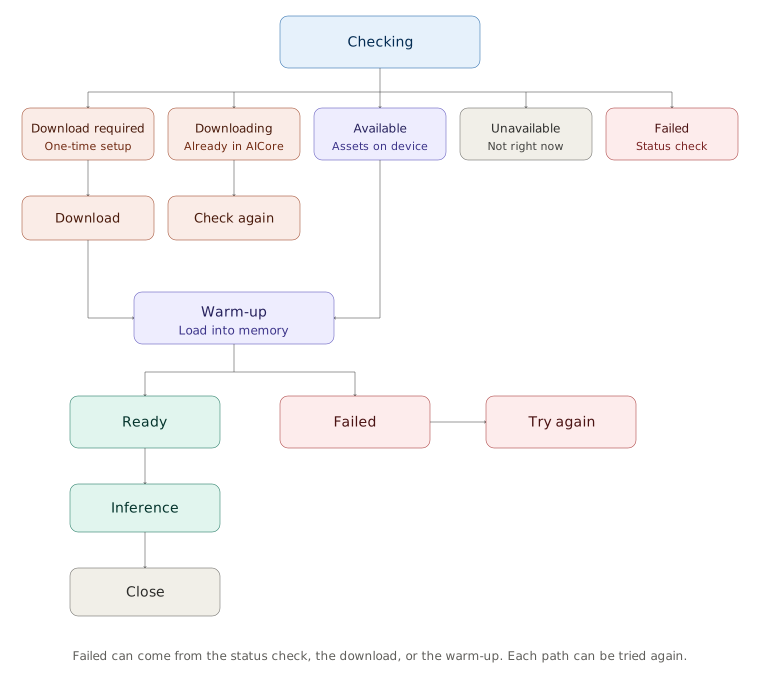
Putting the whole lifecycle together
At this point, the Fitness Coach path looks more like this:
                         ┌─────────────┐
                         │  Checking   │
                         └──────┬──────┘
                                │
      ┌───────────────┬─────────┼───────────────┬──────────────┐
      │               │         │               │              │
      ▼               ▼         ▼               ▼              ▼
DownloadRequired  Downloading  Available    Unavailable      Failed
      │          (in AICore)    │
      ▼               │         │
   Download           ▼         │
      │           Check again   │
      ▼                         │
   Warm-up ◄────────────────────┘
      │
 ┌────┴────┐
 │         │
 ▼         ▼
Ready    Failed ──► Try again
 │
 ▼
Inference
 │
 ▼
Close
Failed can come from any step (the status check, the download, or the warm-up), and every one of them offers a way to try again.
Drawn out, that same path looks like this:
And the thing I want to emphasize is not really the number of states.
It is this:
Every state has a product consequence.
Fitness Coach can translate them into experiences a person actually understands:
| Runtime situation | Fitness Coach experience |
|---|---|
| Checking | “Preparing on-device coaching…” |
| Download required | Explain the one-time setup and offer Download |
| Downloading | Show progress, with a real percentage when the size is known |
| Warming up | “Almost ready…” |
| Ready | Enable Generate insight |
| Unavailable | Explain that on-device coaching is not available right now, and still offer a rule-based suggestion |
| Failed | Offer a clear retry path |
That is much nicer than letting someone tap a button and discover the lifecycle through an exception.
If you want to see all of this without a Gemini Nano device, the sample app has a Fake (needs download) debug mode. It walks through download, warm-up, and ready on any emulator. The complete Android Studio project lives in my Mobile-AI-Experiments repository under fitness-coach/:
Repository: Mobile-AI-Experiments / fitness-coach
What this milestone still does not solve
We can now get Fitness Coach from:
Maybe this feature works here?
to:
The runtime is ready for inference.
That is progress.
It still leaves some very real questions unanswered.
- • How quickly does the first insight appear?
- • What happens if the user asks for another insight while one is already running?
- • What happens if the activity summary changes halfway through inference?
- • How much memory are we using?
- • What does this feel like on a slower supported device?
Those are performance problems.
They deserve their own decisions rather than being stuffed into a lifecycle manager because it was convenient.
So Part 6 will focus on responsiveness, cancellation, concurrency, and measuring actual inference performance.
After that, Part 7 gets into the even messier question:
What happens when the model runs perfectly... and the answer is still not good enough to show?
Where this leaves us
When I started thinking about this part of the series, I called it “model management.”
After building through it, I think the lesson is simpler.
The model being on the device does not mean the model is ready.
There is a whole journey between those two things.
Availability.
Download.
Initialization.
Warm-up.
Failure.
Readiness.
Cleanup.
Once those transitions become normal application state instead of hidden SDK behavior, the architecture gets a lot easier to reason about.
The model can take its time getting ready.
The product just needs to know what to do while it does.
TL;DR
- • AVAILABLE is not the same as ready. Fitness Coach has its own
AiReadinessState. - •
FitnessAiReadinessManagerowns readiness.FitnessInsightEngineowns inference. - • Download completion hands off to warm-up. Warm-up is what emits Ready.
- • Use coroutines for checks, download, warm-up, and inference. Save WorkManager for work that must outlive the screen.
- • Do not persist
modelReady = true. AskcheckStatus(). - • Close the shared
GenerativeModelwhen the ViewModel is cleared.