On-Device Fitness Coach #4: A Production-Ready Architecture for On-Device AI on Android
Here's a mistake I think a lot of us make on the first pass at an AI feature. The excitement of “it works!” takes over, and the model call ends up sitting right inside the composable, or the click handler, or wherever it's fastest to wire up. It runs, it demos great, everyone's happy.
Then three weeks later, someone needs to swap the runtime, or write a test, or add a loading state, and suddenly that one quick model call is tangled through half the UI layer.
This piece is about avoiding that, on purpose, from the start. It's also where Fitness Coach stops being a decision on paper and starts being an actual app.
Defining the Fitness Coach architecture
Before writing anything, it helps to say the whole flow out loud, once, so every piece has a reason for existing.
A person's recent activity gets summarized into something bounded and safe. That summary goes to a use case, the one clear entry point for “generate an insight.” The use case calls an engine, an interface, nothing more. Something behind that interface actually talks to Gemini Nano. The result flows back up through a ViewModel, which turns it into UI state. Compose renders whatever that state says, and nothing more than that.
Written as a chain, it looks like this :
Compose UI
   ↓ observes state
FitnessCoachViewModel
   ↓ calls
GenerateFitnessInsightUseCase
   ↓ calls
FitnessInsightEngine  (interface)
   ↓ implemented by
GeminiNanoInsightEngine  (real, ML Kit GenAI Prompt API)
FakeInsightEngine        (previews, tests, emulator)
Every arrow only goes one direction. Nothing below the ViewModel knows Compose exists, and nothing above the interface knows Gemini Nano exists. That second part is really the whole architecture in one sentence.
Creating FitnessInsightEngine
This interface is doing the real work here. It has exactly one job : take a bounded activity summary, hand back a result. That's it.
interface FitnessInsightEngine {
    suspend fun generateInsight(summary: ActivitySummary): FitnessInsightResult
    fun close()
}
Nothing about Gemini Nano, ML Kit, or any SDK name shows up in this file, and that's deliberate. Whatever sits behind this interface today doesn't have to be what sits behind it in a year. The interface is the promise, the implementation is just whoever's currently keeping it.
Creating GenerateFitnessInsightUseCase
It would be tempting to skip this and have the ViewModel call the engine directly. I get why, it's one less file. But this use case is where later work gets to live without ever touching the UI layer : input validation now, safety filtering and deterministic fallback later, anything else that needs to happen between “here's a summary” and “here's an insight.”
For now it does one honest thing : validate the summary into a bounded ActivitySummary, and hand it to the engine. Invalid input becomes state, not a thrown exception.
class GenerateFitnessInsightUseCase(
    private val engine: FitnessInsightEngine
) {
    suspend operator fun invoke(rawActivitySummary: String): FitnessInsightResult {
        val summary = ActivitySummary.createOrNull(rawActivitySummary)
            ?: return FitnessInsightResult.InvalidInput

        return engine.generateInsight(summary)
    }
}
Small, but it's the seam where the domain logic will grow, not the UI.
Defining the ViewModel and UI state
The ViewModel's job is narrow on purpose : hold the use case, expose state, and nothing else. Compose watches a StateFlow<FitnessCoachUiState> and reacts to whatever it sees.
sealed interface FitnessCoachUiState {
    data object Idle : FitnessCoachUiState
    data object Loading : FitnessCoachUiState
    data class Insight(val text: String) : FitnessCoachUiState
    data object Unavailable : FitnessCoachUiState
    data class Error(val message: String) : FitnessCoachUiState
}
Five states, each one mapping to something specific the UI shows. No ambiguity, no “figure it out from a null.” The Unavailable state matters more than it might look like, since Gemini Nano needs real supported hardware and can't run on an emulator, that state is genuinely the expected everyday experience while developing.
Keeping the runtime hidden from the UI
This is the test I kept coming back to while building this. Could someone read FitnessCoachScreen.kt and FitnessCoachViewModel.kt and have any idea Gemini Nano is involved anywhere?
They can't, and that's the point. The Compose screen collects state and renders it, the ViewModel calls a use case, the use case calls an interface. If Gemini Nano's API changes shape next year, or a better on-device option shows up, the change happens in one file, GeminiNanoInsightEngine, and nothing above it needs to know.
The architecture diagram
The diagram below shows the same flow as above, drawn out. Compose UI at the top, watching state. The ViewModel underneath it, exposing that state and nothing else. The use case below that, the one entry point. Then the interface, sitting right at the boundary, with two implementations branching off it : the real Gemini Nano engine on one side, the fake on the other.
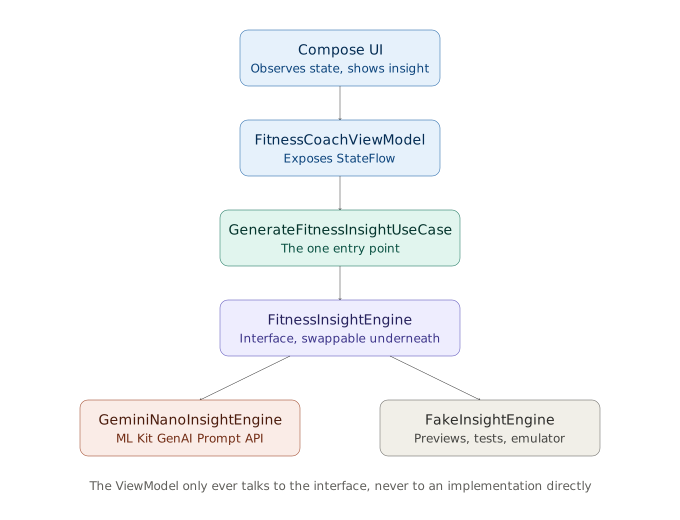
That branch at the bottom is worth sitting with for a second. It's not a temporary scaffold, it's a real part of the architecture.
Why the fake matters as much as the real thing
Something I didn't expect going in : the fake implementation isn't a throwaway, it's genuinely load-bearing. On-device generative AI right now needs specific, supported hardware, an emulator won't run it. So without a fake sitting behind the same interface, there's no way to preview the UI, no way to write a reliable test, no way to develop at all away from a real device.
FakeInsightEngine returns a deterministic, realistic-looking insight instantly. It lets the whole rest of the app get built and verified honestly, even before real inference ever runs on real hardware.
Building the starter sample app structure
This part actually got built, not just described. The starter project has three packages doing exactly what their names say : domain holds the interface, the use case, and the result type, with zero Android or ML Kit imports anywhere in it. data holds both engine implementations, this is the only place in the whole app that imports ML Kit's GenAI Prompt API. ui holds the ViewModel and the Compose screen, and imports neither ML Kit nor anything from data beyond wiring at the edge.
There's a small unit test in there too, testing the use case against the fake, with zero device or network dependency. That test existing at all is the actual payoff of everything above it.
The complete Android Studio starter lives in my Mobile-AI-Experiments repository under fitness-coach/:
Repository: Mobile-AI-Experiments / fitness-coach
What this milestone does not solve yet
Worth saying plainly : this pass does not handle what happens when Gemini Nano reports unavailable in any deeper way, or what a real fallback insight looks like. That belongs in a later post on confidence and fallbacks. Right now, the engine can report that it's unavailable, and the UI can show that honestly, and that's as far as this milestone goes on purpose.
Trying to solve everything in one architecture pass usually means solving nothing well. Better to build the seam now, and fill in the reliability logic once there's a real reason to.
Where this leaves things
A clean architecture diagram and a starter GitHub project are attached alongside this piece. The project actually runs, on an emulator it'll show the real engine's honest “unavailable” path, since Gemini Nano needs real supported hardware to do anything else. When a supported device is in hand, the real engine is already sitting there, wired up and ready, nothing above it needs to change.
That's the whole idea, come along and build it with me, one honest layer at a time.
TL;DR
- • Hide Gemini Nano behind
FitnessInsightEngine. - • ViewModel → use case → interface → implementation.
- • Keep a real engine and a fake engine behind the same seam.
- • UI state should be explicit : Idle, Loading, Insight, Unavailable, Error.
- • Clone the starter under Mobile-AI-Experiments / fitness-coach and open it in Android Studio.